Why Your Website Is Slow Even After Hiring a Developer
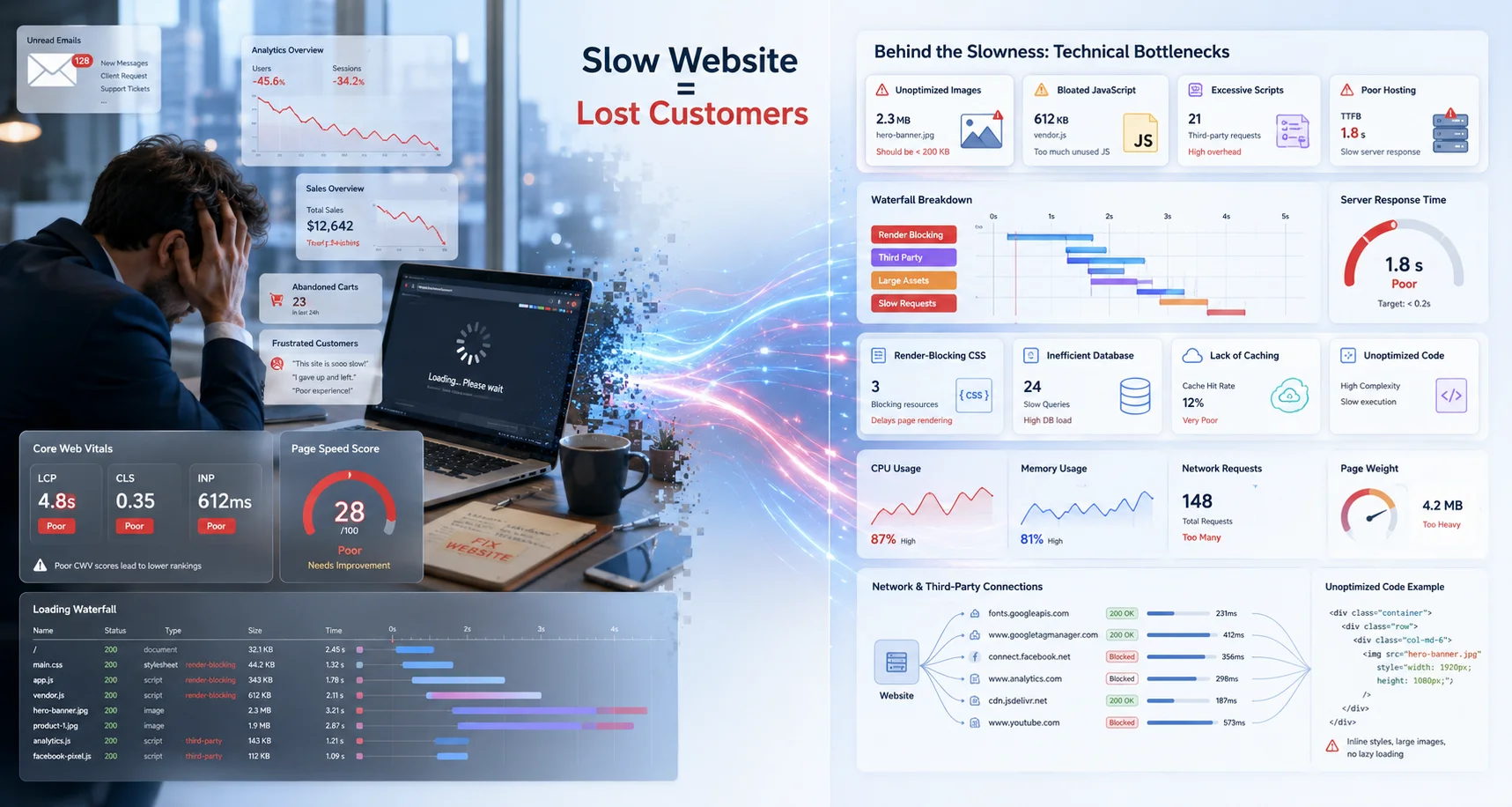
Many businesses assume that hiring a developer automatically guarantees a fast website. In reality, website performance is a specialized engineering discipline, not just a side effect of development.
We regularly audit websites that were recently redesigned, rebuilt, or migrated by agencies or freelancers, yet still suffer from:
- Slow loading speeds
- Poor Core Web Vitals
- High bounce rates
- Laggy mobile experience
- Low SEO visibility
- Weak conversion performance
The reason is simple: most websites are built to function, not engineered for performance.
Modern website speed optimization involves frontend engineering, server infrastructure, caching systems, image processing, script management, and user experience optimization working together.
This article explains why websites often remain slow even after hiring developers — and what actually needs to be optimized.
Website Speed Problems Usually Start Before the Code
A slow website is rarely caused by a single issue. In most cases, performance problems come from multiple layers of technical decisions stacking together.
For example:
- Cheap hosting environments
- Bloated themes or builders
- Unoptimized plugins
- Large media files
- Third-party tracking scripts
- Inefficient frontend rendering
- Poor database structure
Even skilled developers cannot fully compensate for a weak infrastructure setup.
Hiring a Developer Is Not the Same as Hiring a Performance Engineer
This is one of the biggest misconceptions businesses make.
A developer may successfully build features, pages, forms, dashboards, or integrations, but performance engineering requires a different mindset.
Performance-focused engineering involves:
- Reducing render-blocking resources
- Optimizing network requests
- Minimizing JavaScript execution
- Implementing efficient caching strategies
- Improving Core Web Vitals
- Reducing Time to First Byte (TTFB)
- Optimizing asset delivery pipelines
- Controlling layout shifts
Most business websites are never properly audited at this level.
Poor Hosting Can Destroy Performance
One of the most overlooked causes of slow websites is low-quality hosting.
Businesses often spend heavily on design and development while running the site on overloaded shared servers.
Common hosting-related problems include:
- Slow server response times
- High CPU contention
- Limited memory allocation
- Outdated PHP versions
- Poor database performance
- Weak caching support
If the server itself is slow, frontend optimization alone cannot fully solve the issue.
For business-critical websites, hosting infrastructure should be treated as part of the product architecture, not just a recurring expense.
Large Images Quietly Kill Website Speed
Image optimization remains one of the biggest performance failures across business websites.
Typical issues include:
- Uploading 5MB+ images directly from cameras or Canva exports
- Using PNGs where WebP would work better
- Serving desktop-sized images on mobile
- Missing lazy loading
- No responsive image handling
We often see websites where images account for over 70% of total page weight.
Modern performance optimization requires:
- WebP or AVIF conversion
- Responsive image sizing
- Compression pipelines
- Lazy loading implementation
- CDN-assisted image delivery
Too Many Plugins and Third-Party Scripts
Marketing tools are useful, but every external script adds performance cost.
Many websites load:
- Multiple analytics systems
- Chat widgets
- Heatmaps
- Social media embeds
- Popup systems
- Tracking pixels
- Animation libraries
Each script introduces:
- Additional DNS lookups
- Network requests
- JavaScript parsing
- Main-thread blocking
In many cases, businesses unknowingly slow down their own websites while trying to improve marketing visibility.
Common Real-World Scenario
We recently audited a business website that loaded:
- Facebook Pixel
- Google Analytics
- Hotjar
- Three live chat systems
- Two popup tools
- Multiple unused Elementor addons
The homepage looked visually simple, yet the browser was executing hundreds of unnecessary requests.
Heavy Page Builders Often Create Bloated Frontend Code
Many page builders prioritize design flexibility over performance efficiency.
As a result, websites often generate:
- Massive DOM structures
- Unused CSS
- Duplicate JavaScript
- Nested layout rendering
- Excessive animations
This becomes especially problematic on mobile devices where CPU performance is lower.
A website that feels acceptable on a high-end laptop may perform poorly on real-world mobile networks.
Frontend Performance Is More Important Than Most Businesses Realize
Many website owners focus only on backend development while ignoring frontend rendering performance.
However, modern search engines and users both care heavily about actual browser experience.
Metrics like:
- Largest Contentful Paint (LCP)
- Interaction to Next Paint (INP)
- Cumulative Layout Shift (CLS)
directly affect:
- User retention
- SEO visibility
- Conversion rates
- Ad performance
- Mobile usability
Performance optimization today is tightly connected with technical SEO.
Caching Is Often Misconfigured or Completely Missing
Many websites either:
- Have no caching configured
- Use poor default caching
- Cache incorrectly
Effective caching systems reduce server workload dramatically and improve page delivery speed.
Important caching layers include:
- Browser caching
- Page caching
- Object caching
- Database query caching
- CDN edge caching
Without proper caching architecture, even well-built websites can become slow under traffic.
Performance Optimization Is an Ongoing Process
One-time development is not enough.
Websites continuously change due to:
- New plugins
- Marketing tools
- Content uploads
- Theme updates
- Tracking scripts
- Feature additions
Performance must be monitored and maintained continuously.
This is especially important for:
- Business websites
- SaaS platforms
- Lead generation sites
- E-commerce systems
- CRM dashboards
- Automation platforms
What a Proper Website Performance Audit Should Include
A professional performance optimization process should analyze:
- Server response performance
- Frontend rendering bottlenecks
- Core Web Vitals
- JavaScript execution cost
- CSS efficiency
- Image delivery
- Database performance
- Third-party script impact
- Mobile rendering behavior
- Caching architecture
Simply running a speed plugin is not enough for serious optimization.
Conclusion
If your website is still slow after hiring developers, the issue may not be the developer alone. The real problem is often the absence of performance-focused engineering.
Modern websites require optimization at multiple layers:
- Infrastructure
- Frontend architecture
- Asset delivery
- Caching systems
- Technical SEO
- User experience engineering
Businesses that treat website performance seriously usually see improvements in:
- SEO rankings
- User engagement
- Lead conversion
- Mobile usability
- Advertising efficiency
Need Help Optimizing Your Website Performance?
At Code With Agni, we provide performance-focused optimization for business websites, SaaS systems, custom platforms, and lead-generation websites.
Our optimization process focuses on real-world performance engineering instead of superficial speed scores.
Explore our Website Performance Optimization service to identify what is actually slowing down your website.